To save Character.AI chats as a PDF, request your data export in Character.AI settings, then drop the emailed ZIP on BotToBook. Pick the chats, type the character's name, press PDF book and choose Save as PDF in the print dialog. You get a cover, a chapter per chat and page numbers.
Open my export in BotToBookSteps
- Request your export in Character.AI (Profile Settings → Account → Manage Account & Data → Export Data).
- Drop the ZIP on BotToBook and type your account email in lowercase as the password.
- Name each chat: type the character's name, and press Swap who said what if a chat comes out backwards.
- Pick the chats to include and a page size: paperback 5.5 × 8.5 in, US Letter, A4 or A5.
- Press PDF book and choose Save as PDF in the print dialog.
What the PDF looks like
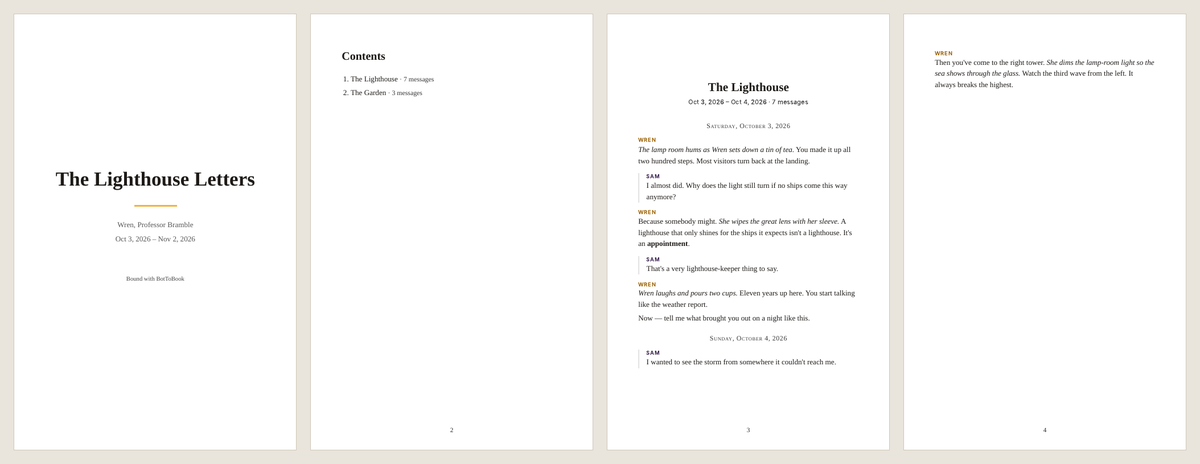
A cover with the title and the characters' names, a contents page when there's more than one chat, then each chat as a chapter with date headings and page numbers. Your browser does the typesetting, so every language and emoji comes out right.
On iPhone and Android
Press PDF book, then on iPhone tap Share → Print, and Share again → Save to Files. On Android choose Print → Save as PDF.
Free vs Pro
Reading every chat, text downloads and a short preview book from your own chats are free. The full PDF, EPUB and HTML books are $4.99 once — a typeset book, not a printout.
Questions
How do I turn my Character AI chats into a PDF?
Request your data export in Character.AI settings. When the email arrives, drop the ZIP on BotToBook and enter your account email in lowercase as the password. Pick the chats, type the character's name, press PDF book, then choose Save as PDF in the print dialog. Each chat becomes a chapter with page numbers.
Can I save Character AI chats as a PDF on my phone?
Yes. Open BotToBook in your phone's browser, drop the export ZIP, and press PDF book. On iPhone tap Share, then Print, then Share again and Save to Files. On Android choose Print and then Save as PDF. The book keeps its cover, chapters and page breaks.
Can I save a Character AI chat as a PDF without the export?
You can scroll a chat to the top and use your browser's Print and Save as PDF, or copy the text into a document, but long chats load in pieces and the layout is rough. The official export contains every message, so it is the more complete way to keep a chat.
Is BotToBook free?
Opening your Character.AI export, reading every chat, setting names and downloading any chat as a text file are free, and you can preview a short book from your own chats. Full PDF, EPUB and HTML books cost $4.99 once, with no subscription, on up to three devices. A sample export is loaded so you can try every button first.